
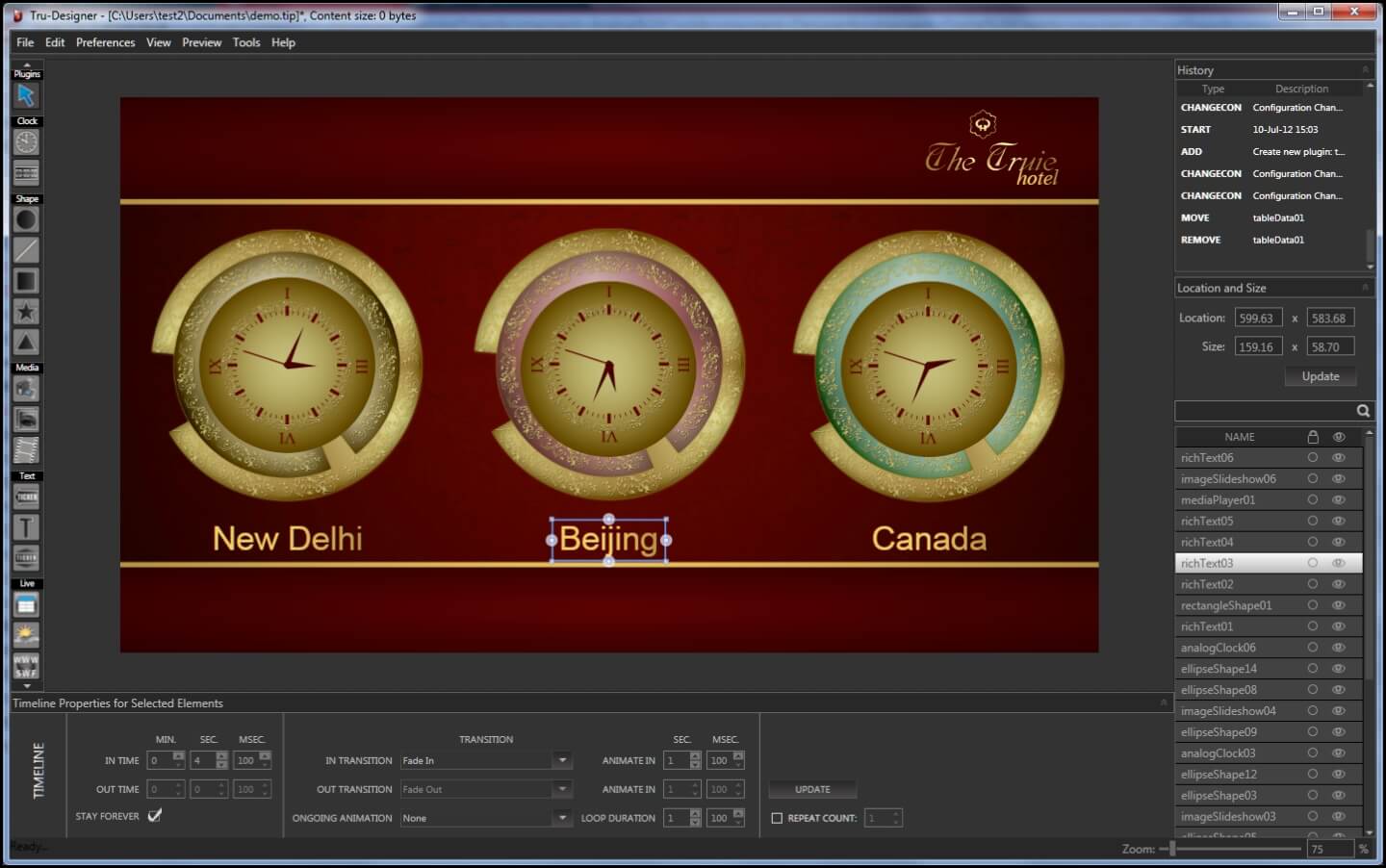
Designing the screen
Tru-Designer is drag and drop, with as many freely placed zones as a layout needs. There is no render step: the preview is what the player shows, so a change is checked and published rather than exported and hoped over.
It layers with full transparency, plays video, images and audio in the common formats at any resolution and orientation, and takes a live feed straight in. A capture card lets a screen carry live television, a camera, or a VGA, DVI or HDMI input alongside the scheduled content.
Scheduling and running the network
Tru-Scheduler is the timeline. Content is planned by hour or by day, per screen or per group of screens, and pushed from one place whether that is a single display or every site you run.
What happens on the screen
Tru-Player runs what the designer built, at whatever resolution the screen is, mounted horizontally or vertically, and talks back to the scheduler over an encrypted connection.
It watches itself. After a power cut or a network drop it returns to the state it was last in, rather than sitting on a desktop until somebody walks past and notices. It also logs what actually played, which is the part that matters when an advertiser asks what they paid for.
Hardware requirements are modest, and it drives touch-screen kiosks as well as ordinary displays.
The three modules
Tru-Designer
Where the screen is built. Unlimited free-form zones, layering and transparency, live inputs, and a preview that matches the output exactly.
Tru-Scheduler
The timeline and the remote control. What plays, where, and when, plus reboots, screenshots, health checks and emergency alerts.
Tru-Player
What runs on each screen. Self-recovering after a failure, logging what played, on modest hardware.
Who it suits
Businesses running more than a handful of screens, more than one site, or content that has to change on a schedule rather than when somebody remembers. If you have one screen in a waiting room, SylvrSign costs less and does that job.
Questions we get asked
- Can a screen show live television or a camera feed?
- Yes, through a capture card. Live TV, a camera, or a VGA, DVI or HDMI input can sit in a zone alongside everything else on the layout.
- What happens when a screen loses its connection?
- The player keeps playing what it already has. When the connection returns, an interrupted transfer resumes from where it stopped rather than starting again.
- Can we put an urgent message on every screen at once?
- Yes. Emergency alerts are a single action from the scheduler and go to every screen on the network.
- Can we prove what played?
- The player logs playback, presentation and its own health. That record is what you need when somebody paying for screen time asks.
- Can it run different content in different locations?
- Yes. Scheduling is per screen and per group, so a store in one suburb can show something different from a store in another.
- Do we design the content or do you?
- Either. You can create your own, we can create it for you, or we can take designs you already have and keep refining them until they are right.